
Monthly Payment Plan
The University is pleased to offer a new monthly payment plan option in ePay. The monthly payment plan is an interest-free alternative to one-time payments that are due at billing time. This option allows you to spread out your payment for the semester over a period of months and can limit the amount of loan money you may need to borrow to meet the cost of education.
Plan Details and Features
- $55 enrollment fee per semester (non-refundable/non-transferable)
- Payments are due on the 15th of each month
- Automatic withdrawal from your checking or savings account (optional)
- Monthly payments are automatically recalculated to include any additional charges and/or additional payments or financial aid that wasn’t originally budgeted
- Simple, quick enrollment directly in ePay
Payment Plan Options
Open Enrollment: 4/15/26 - 5/14/26
Due Dates
- Payment 1: 5/15/26
- Payment 2: 6/15/26
- Payment 3: 7/15/26
Open Enrollment: 6/15/26 - 7/14/26
Due Dates
- Payment 1: 7/15/26
- Payment 2: 8/15/26
- Payment 3: 9/15/26
- Payment 4: 10/15/26
- Payment 5: 11/15/26
Open Enrollment: 11/15/26 - 12/14/26
Due Dates
- Payment 1: 12/15/26
- Payment 2: 1/15/27
- Payment 3: 2/15/27
- Payment 4: 3/15/27
- Payment 5: 4/15/27
How To Enroll
Students and authorized users can enroll in the monthly payment plan by logging into ePay.
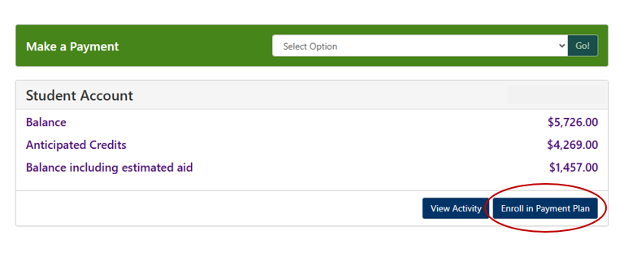
Once logged in, click the Enroll in Payment Plan button found on the main page under the Student Account Section.
Please Note: Registration, additional payments, financial aid, loans and/or outside scholarships MUST be finalized and in place before enrolling in the monthly payment plan. Failure to do so will result in your monthly payments being calculated incorrectly.
*Prior collection students are not eligible to enroll in the University’s monthly payment plan option.
Payment Plan Balance Adjustments
ePay continuously monitors your student account and automatically adjusts your payment plan whenever changes occur. As a result, your monthly payment amount may increase or decrease throughout the semester.
If updates are made to your account - such as adding or dropping a course, selecting a new meal plan, or changes to your financial aid - your payment plan will be recalculated to reflect the new balance. Any increase or decrease in your total amount due will be spread evenly across your remaining scheduled payments.
Please Note: Changes made within 14 days of an upcoming payment will not impact that installment. Instead, any adjustments will be applied to the payments that follow.
Students/authorized users will receive an email notification if installment amounts change.
Frequently Asked Questions
Yes. Payment plans are set up per term and do not automatically renew.
Unfortunately, no. The system cannot accommodate having more than one plan per student per semester.
Payments can be made in ePay each month by eCheck or credit/debit card. Convenience fees apply for credit/debit card payments.
During payment plan enrollment, automatic payments may be selected for future installments. If the option for automatic payments is not selected, payment must be made manually each month by the due date.
You will need to update your payment method and submit the missed payment. Additional fees may apply.
Authorized users will only receive notifications about payment plans if the student has granted this access in ePay. To ensure that your authorized user has been set up to receive notifications, follow these steps:
- Log into ePay via the myCharger portal.
- Navigate to the authorized user setup under “My Profile Setup.”
- Click the “Action” icon next to the name of your authorized user.
- Select “Yes” next to the “Would you like to allow this person to receive your payment plan communications?”
- A 5-day grace period applies.
- A 1% late fee will apply for each installment not paid after the grace period ends.
- Your account may be placed on a financial hold.
- If any monthly payment is more than 30 days overdue, the plan may be canceled, and the full balance will be immediately due. Additional late fees may apply.
Your payment plan may be adjusted to reflect changes in your account balance. You will be notified if your monthly payment amount changes.
Contact the One Stop
Bursar's Office
(203) 932-7217
bursar@newhaven.edu
Financial Aid
(203) 932-7315
financialaid@newhaven.edu
Registrar's Office
(203) 932-7309
registrar@newhaven.edu
Located in Bergami Hall
Hours
Mon. - Thu.: 8:30 a.m. - 4:30 p.m.
Fri: 8:30 a.m. - 1:30 p.m.